
 ## What is Schema Drift?
Schema drift is any change to database structure:
| Column | Before (Discovery T1) | After (Discovery T2) | Change |
| ------------------ | --------------------- | -------------------- | ------------------------------------------------- |
| id | `integer` | `integer` | No change |
| user\_id | `integer` | `integer` | No change |
| status | `varchar` | -- | **Removed** (or renamed) |
| order\_status | -- | `varchar` | **Added** (possibly renamed from `status`) |
| total | `decimal` | `decimal` | No change |
| shipping\_date | `timestamp` | -- | **Removed** (or renamed) |
| shipping\_estimate | -- | `timestamp` | **Added** (possibly renamed from `shipping_date`) |
| delivery\_fee | -- | `decimal` | **Added** |
| created\_at | `timestamp` | `timestamp` | No change |
## Types of Schema Drift
### Breaking Changes (High Risk)
Changes that will cause immediate failures:
| Change | Example | Impact |
| ---------------------------- | ------------------------- | ------------------------------ |
| **Column Removed** | `shipping_status` deleted | Queries referencing it fail |
| **Table Removed** | `legacy_orders` dropped | All queries to table fail |
| **Column Renamed** | `status` → `order_status` | Queries using old name fail |
| **Incompatible Type Change** | `varchar` → `integer` | Type mismatches, cast failures |
### Non-Breaking Changes (Low-Medium Risk)
Changes that usually don't cause immediate failures:
| Change | Example | Impact |
| -------------------------- | ------------------------------ | ----------------------------------------- |
| **Column Added** | New `delivery_fee` column | Existing queries work; new data available |
| **Table Added** | New `order_items` table | No impact on existing queries |
| **Compatible Type Change** | `varchar(50)` → `varchar(100)` | Usually transparent |
| **Constraint Added** | New unique constraint | May affect inserts, not selects |
## How Drift is Detected
AnomalyArmor compares consecutive discovery runs:
| Column | Run #1 (Baseline) | Run #2 (Comparison) | Result |
| ------------- | ----------------- | ------------------- | ----------- |
| id | Present | Present | No change |
| user\_id | Present | Present | No change |
| status | Present | Missing | **Removed** |
| total | Present | Present | No change |
| order\_status | Missing | Present | **Added** |
| created\_at | Present | Present | No change |
**Detected drift**: Column `status` removed, column `order_status` added (possibly a rename, investigate).
### Detection Timing
| Discovery Schedule | Max Detection Delay |
| ------------------ | ------------------- |
| Every 15 minutes | 15 minutes |
| Hourly | 1 hour |
| Daily | 24 hours |
## What is Schema Drift?
Schema drift is any change to database structure:
| Column | Before (Discovery T1) | After (Discovery T2) | Change |
| ------------------ | --------------------- | -------------------- | ------------------------------------------------- |
| id | `integer` | `integer` | No change |
| user\_id | `integer` | `integer` | No change |
| status | `varchar` | -- | **Removed** (or renamed) |
| order\_status | -- | `varchar` | **Added** (possibly renamed from `status`) |
| total | `decimal` | `decimal` | No change |
| shipping\_date | `timestamp` | -- | **Removed** (or renamed) |
| shipping\_estimate | -- | `timestamp` | **Added** (possibly renamed from `shipping_date`) |
| delivery\_fee | -- | `decimal` | **Added** |
| created\_at | `timestamp` | `timestamp` | No change |
## Types of Schema Drift
### Breaking Changes (High Risk)
Changes that will cause immediate failures:
| Change | Example | Impact |
| ---------------------------- | ------------------------- | ------------------------------ |
| **Column Removed** | `shipping_status` deleted | Queries referencing it fail |
| **Table Removed** | `legacy_orders` dropped | All queries to table fail |
| **Column Renamed** | `status` → `order_status` | Queries using old name fail |
| **Incompatible Type Change** | `varchar` → `integer` | Type mismatches, cast failures |
### Non-Breaking Changes (Low-Medium Risk)
Changes that usually don't cause immediate failures:
| Change | Example | Impact |
| -------------------------- | ------------------------------ | ----------------------------------------- |
| **Column Added** | New `delivery_fee` column | Existing queries work; new data available |
| **Table Added** | New `order_items` table | No impact on existing queries |
| **Compatible Type Change** | `varchar(50)` → `varchar(100)` | Usually transparent |
| **Constraint Added** | New unique constraint | May affect inserts, not selects |
## How Drift is Detected
AnomalyArmor compares consecutive discovery runs:
| Column | Run #1 (Baseline) | Run #2 (Comparison) | Result |
| ------------- | ----------------- | ------------------- | ----------- |
| id | Present | Present | No change |
| user\_id | Present | Present | No change |
| status | Present | Missing | **Removed** |
| total | Present | Present | No change |
| order\_status | Missing | Present | **Added** |
| created\_at | Present | Present | No change |
**Detected drift**: Column `status` removed, column `order_status` added (possibly a rename, investigate).
### Detection Timing
| Discovery Schedule | Max Detection Delay |
| ------------------ | ------------------- |
| Every 15 minutes | 15 minutes |
| Hourly | 1 hour |
| Daily | 24 hours |
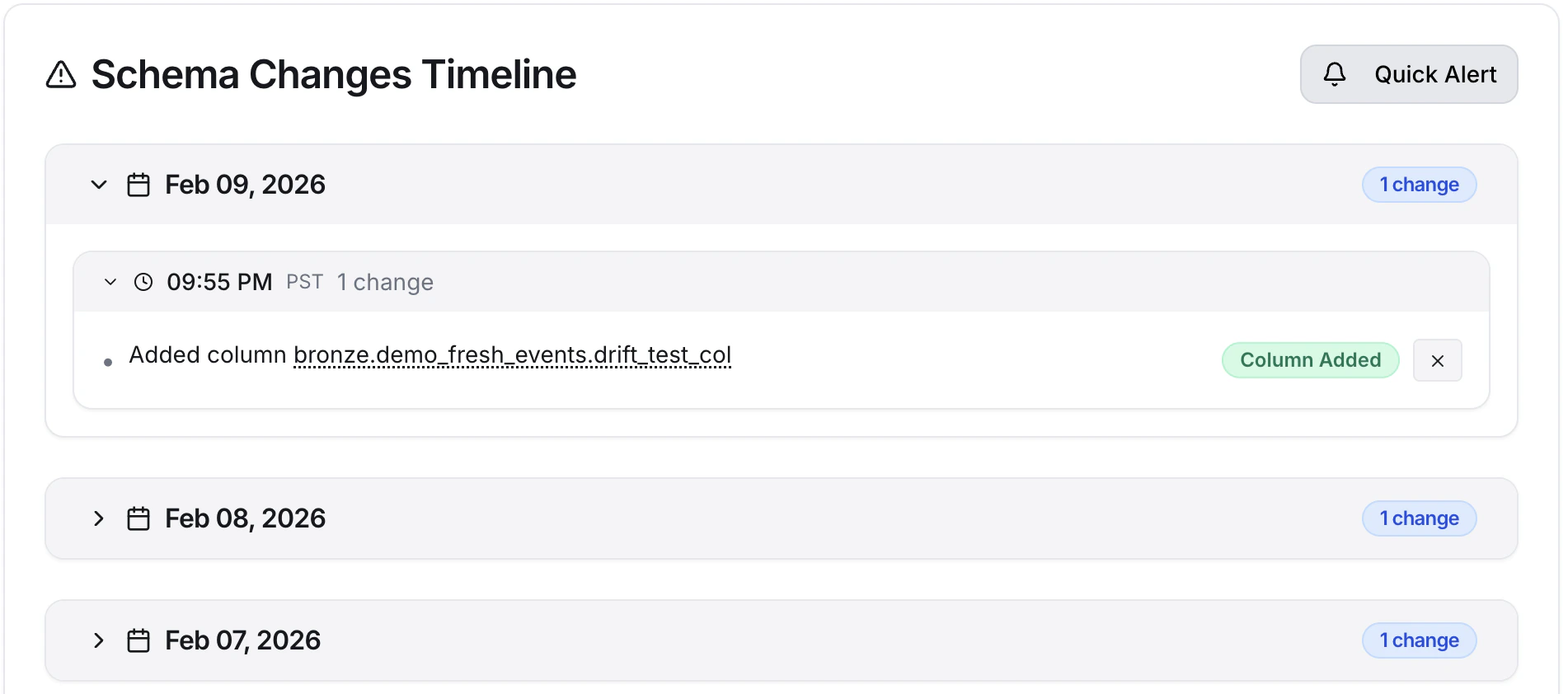 ### Change Details
Click any change to see details:
* **Before state**: Previous column definition
* **After state**: New column definition (or "Removed")
* **Detection time**: When the change was discovered
* **Discovery run**: Which scan found it
## Schema Drift Alerts
### Setting Up Alerts
Create rules to notify you of drift:
| Field | Value |
| ---------------- | ------------------------------------------- |
| **Name** | Production Breaking Changes |
| **Event** | Schema Change Detected |
| **Data source** | `production-postgres` |
| **Schema** | `public`, `analytics` |
| **Change type** | Column Removed, Table Removed, Type Changed |
| **Destinations** | Slack, PagerDuty |
### Alert Content
Schema drift alerts include:
```
⚠️ Schema Change Detected
Asset: production.public.orders
Changes detected:
• Column removed: status (varchar)
• Column added: order_status (varchar)
Detected: January 15, 2024 at 8:00 AM UTC
Discovery Run: #1234
[View Details] [View Asset]
```
## Common Drift Scenarios
### Scenario 1: Column Rename
**Symptom**: Column removed + column added with similar name
```
Detected changes:
- Column removed: user_email
- Column added: email_address
This is likely a rename.
```
**Action**:
1. Confirm it's a rename (ask the upstream team)
2. Update all downstream references
3. Verify queries work with new name
### Scenario 2: Unannounced Migration
**Symptom**: Multiple columns changed in related tables
```
Detected changes in users:
- Column type changed: phone (varchar → jsonb)
- Column added: phone_verified (boolean)
Detected changes in user_profiles:
- Column removed: phone_number
```
**Action**:
1. Identify the migration (check with upstream team)
2. Review impact on your queries
3. Update affected models
### Scenario 3: Table Dropped
**Symptom**: Table no longer exists
```
Asset removed: public.legacy_orders
Last seen: January 14, 2024
This could be:
- Intentional removal
- Renamed table
- Permission change
- Wrong database connected
```
**Action**:
1. Verify if intentional
2. Update any queries referencing it
3. Check if data was migrated elsewhere
### Scenario 4: Type Change
**Symptom**: Column data type modified
```
Column: products.price
Type change: integer → decimal(10,2)
```
**Action**:
1. Review aggregations (SUM, AVG) for precision changes
2. Check comparisons and arithmetic
3. Verify no type casting issues
## Managing Expected Drift
### Planned Schema Changes
When you know changes are coming:
1. **Communicate**: Tell your team about upcoming changes
2. **Prepare**: Update downstream code in advance (staged rollout)
3. **Execute**: Make the schema change
4. **Verify**: Confirm AnomalyArmor detects it
5. **Acknowledge**: Mark alerts as expected
### Disabling Rules During Migrations
For large migrations:
1. Go to **Alerts → Rules**
2. Toggle OFF relevant rules
3. Perform migration
4. Review detected changes
5. Toggle rules back ON
### Change Details
Click any change to see details:
* **Before state**: Previous column definition
* **After state**: New column definition (or "Removed")
* **Detection time**: When the change was discovered
* **Discovery run**: Which scan found it
## Schema Drift Alerts
### Setting Up Alerts
Create rules to notify you of drift:
| Field | Value |
| ---------------- | ------------------------------------------- |
| **Name** | Production Breaking Changes |
| **Event** | Schema Change Detected |
| **Data source** | `production-postgres` |
| **Schema** | `public`, `analytics` |
| **Change type** | Column Removed, Table Removed, Type Changed |
| **Destinations** | Slack, PagerDuty |
### Alert Content
Schema drift alerts include:
```
⚠️ Schema Change Detected
Asset: production.public.orders
Changes detected:
• Column removed: status (varchar)
• Column added: order_status (varchar)
Detected: January 15, 2024 at 8:00 AM UTC
Discovery Run: #1234
[View Details] [View Asset]
```
## Common Drift Scenarios
### Scenario 1: Column Rename
**Symptom**: Column removed + column added with similar name
```
Detected changes:
- Column removed: user_email
- Column added: email_address
This is likely a rename.
```
**Action**:
1. Confirm it's a rename (ask the upstream team)
2. Update all downstream references
3. Verify queries work with new name
### Scenario 2: Unannounced Migration
**Symptom**: Multiple columns changed in related tables
```
Detected changes in users:
- Column type changed: phone (varchar → jsonb)
- Column added: phone_verified (boolean)
Detected changes in user_profiles:
- Column removed: phone_number
```
**Action**:
1. Identify the migration (check with upstream team)
2. Review impact on your queries
3. Update affected models
### Scenario 3: Table Dropped
**Symptom**: Table no longer exists
```
Asset removed: public.legacy_orders
Last seen: January 14, 2024
This could be:
- Intentional removal
- Renamed table
- Permission change
- Wrong database connected
```
**Action**:
1. Verify if intentional
2. Update any queries referencing it
3. Check if data was migrated elsewhere
### Scenario 4: Type Change
**Symptom**: Column data type modified
```
Column: products.price
Type change: integer → decimal(10,2)
```
**Action**:
1. Review aggregations (SUM, AVG) for precision changes
2. Check comparisons and arithmetic
3. Verify no type casting issues
## Managing Expected Drift
### Planned Schema Changes
When you know changes are coming:
1. **Communicate**: Tell your team about upcoming changes
2. **Prepare**: Update downstream code in advance (staged rollout)
3. **Execute**: Make the schema change
4. **Verify**: Confirm AnomalyArmor detects it
5. **Acknowledge**: Mark alerts as expected
### Disabling Rules During Migrations
For large migrations:
1. Go to **Alerts → Rules**
2. Toggle OFF relevant rules
3. Perform migration
4. Review detected changes
5. Toggle rules back ON