

Schema diff visualization showing column changes
What is Schema Drift?
Schema drift is any change to database structure:Types of Schema Drift
Breaking Changes (High Risk)
Changes that will cause immediate failures:Non-Breaking Changes (Low-Medium Risk)
Changes that usually don’t cause immediate failures:How Drift is Detected
AnomalyArmor compares consecutive discovery runs:
Detected drift: Column
status removed, column order_status added (possibly a rename, investigate).
Detection Timing
Viewing Schema Drift
Asset Schema History
- Navigate to Assets
- Click on a table
- Select Schema History tab
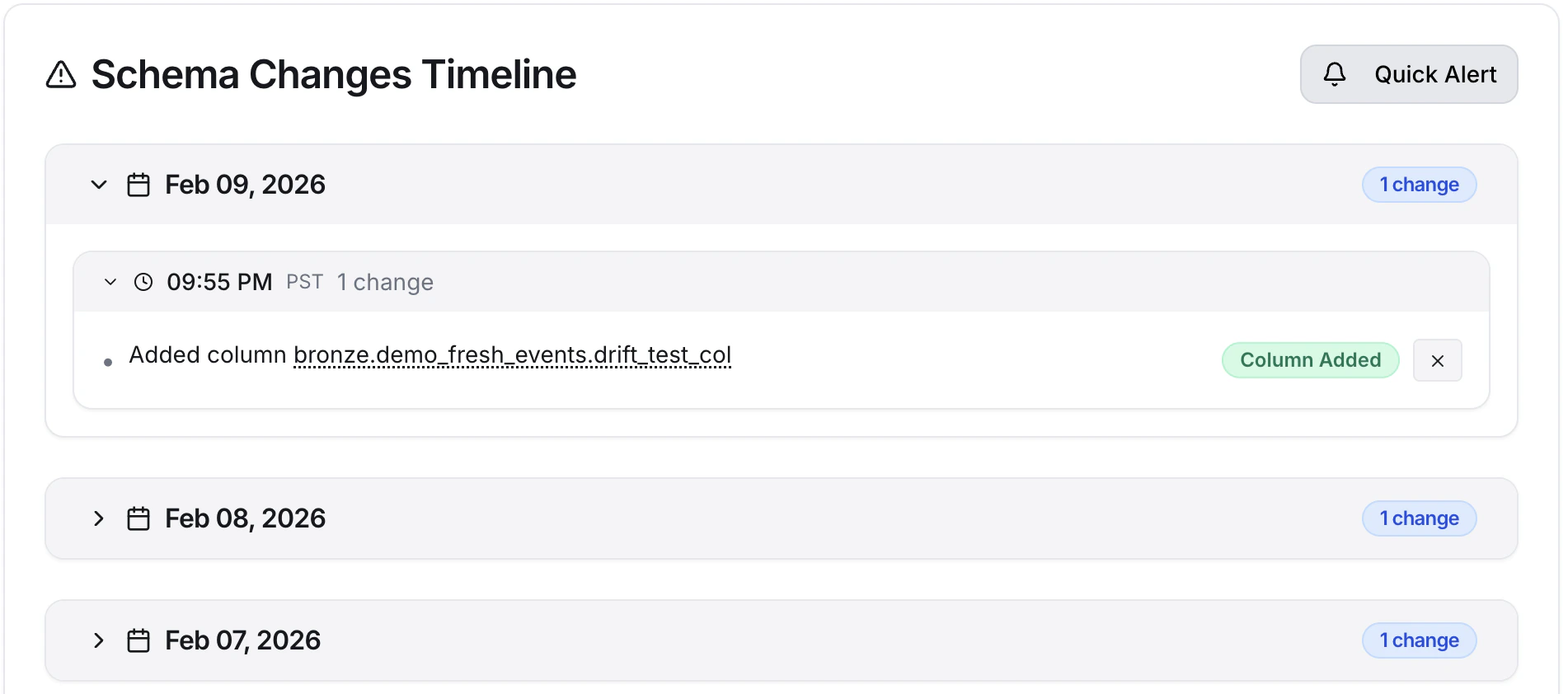
Schema change history showing column additions, removals, and modifications over time
Change Details
Click any change to see details:- Before state: Previous column definition
- After state: New column definition (or “Removed”)
- Detection time: When the change was discovered
- Discovery run: Which scan found it
Schema Drift Alerts
Setting Up Alerts
Create rules to notify you of drift:Alert Content
Schema drift alerts include:Common Drift Scenarios
Scenario 1: Column Rename
Symptom: Column removed + column added with similar name- Confirm it’s a rename (ask the upstream team)
- Update all downstream references
- Verify queries work with new name
Scenario 2: Unannounced Migration
Symptom: Multiple columns changed in related tables- Identify the migration (check with upstream team)
- Review impact on your queries
- Update affected models
Scenario 3: Table Dropped
Symptom: Table no longer exists- Verify if intentional
- Update any queries referencing it
- Check if data was migrated elsewhere
Scenario 4: Type Change
Symptom: Column data type modified- Review aggregations (SUM, AVG) for precision changes
- Check comparisons and arithmetic
- Verify no type casting issues
Managing Expected Drift
Planned Schema Changes
When you know changes are coming:- Communicate: Tell your team about upcoming changes
- Prepare: Update downstream code in advance (staged rollout)
- Execute: Make the schema change
- Verify: Confirm AnomalyArmor detects it
- Acknowledge: Mark alerts as expected
Disabling Rules During Migrations
For large migrations:- Go to Alerts → Rules
- Toggle OFF relevant rules
- Perform migration
- Review detected changes
- Toggle rules back ON
Drift Prevention
Schema Versioning
Coordinate schema changes with version control:- Use migration tools (Flyway, Alembic, Atlas)
- Review migrations before applying
- Test in staging first
Change Communication
Establish processes:- Schema change announcements
- Dependency mapping
- Impact assessment before changes
Backward Compatibility
When changing schemas:- Add new columns instead of modifying existing
- Keep old columns during transition periods
- Use views to maintain compatibility
Troubleshooting
Drift detected but change was intentional
Drift detected but change was intentional
This is expected behavior. AnomalyArmor doesn’t know intent. It reports all changes. Consider:
- Acknowledging the alert
- Documenting the change in your records
- Disabling rules during planned migrations
Drift not detected
Drift not detected
- Check discovery schedule: Has discovery run since the change?
- Check scope: Is the table in a monitored schema?
- Check permissions: Can AnomalyArmor user see the table?
- Run manual discovery: Trigger discovery to check now
Too many drift alerts
Too many drift alerts
- Filter by change type: Alert only on breaking changes (removed columns/tables)
- Exclude dev/test: Don’t monitor volatile environments
- Use patterns: Exclude
*_temp,*_backuptables
False positive - rename detected as remove+add
False positive - rename detected as remove+add
This is expected. AnomalyArmor can’t automatically determine if a remove+add pair is a rename. You should:
- Investigate the pair manually
- Document the rename in your records
- Update downstream references
Best Practices
- Monitor production closely: Run frequent discovery, alert immediately
- Differentiate environments: Different rules for prod vs. dev
- Route by change type: Breaking changes → PagerDuty; additions → Email
- Review history regularly: Check drift patterns to identify risky areas
- Coordinate changes: Communicate schema changes before making them
Common Questions
What counts as a breaking schema change?
Column removals, table removals, column renames, and incompatible type changes (such asvarchar to integer) will break queries immediately. Additions and compatible type widenings (varchar(50) to varchar(100)) usually don’t.
How do I avoid alert storms during a planned migration?
Disable the relevant alert rules in Alerts → Rules before the migration, let the changes flow through, then toggle the rules back on. Set a calendar reminder, leaving rules off is a common mistake.Can AnomalyArmor detect renames automatically?
No. A rename shows up as a column removed plus a column added with a similar name. The UI flags the pair as a possible rename, but confirming intent still requires a human to check with the upstream team.Why did drift get detected for a change I made intentionally?
AnomalyArmor reports all structural changes, it has no way to know which ones you planned. Acknowledge the alert, document the change, and optionally disable the rule during known migration windows.What should I do first when a breaking change is detected in production?
Open the asset’s schema history to see exactly what changed and when. Then check downstream dependencies, such as views, models, and dashboards, that reference the affected column or table, and coordinate fixes before more queries fail.Does detection work on views and materialized views, not just tables?
Yes. Discovery catalogs tables, views, and their underlying columns, so drift on views is detected the same way. See Asset Discovery for what’s captured.Related Topics
Schema Monitoring Overview
Broader schema monitoring capabilities
Alert Rules
Configure drift alerts
Schema Changes Concept
Deep dive into change types
Asset Discovery
How assets are discovered